USB Explained
USB was meant to simplify everything, but it actually created multiple hidden standards under one name. This guide breaks down USB versions, USB-C, and why identical ports can act completely differently in a studio setup.
Ian Gardner is a British-American broadcaster, voice artist and audio enthusiast, sharing years of experience building creative workflows from a modern home studio. He helps readers make smarter buying decisions across studio gear, production tools and home comforts for both inside and outside the workspace. Broadcasters, podcasters, voice artists, producers and digital creators will find guidance that supports high production values and efficient workflows for building a successful home studio business. Similar articles can be found in the computers blog.
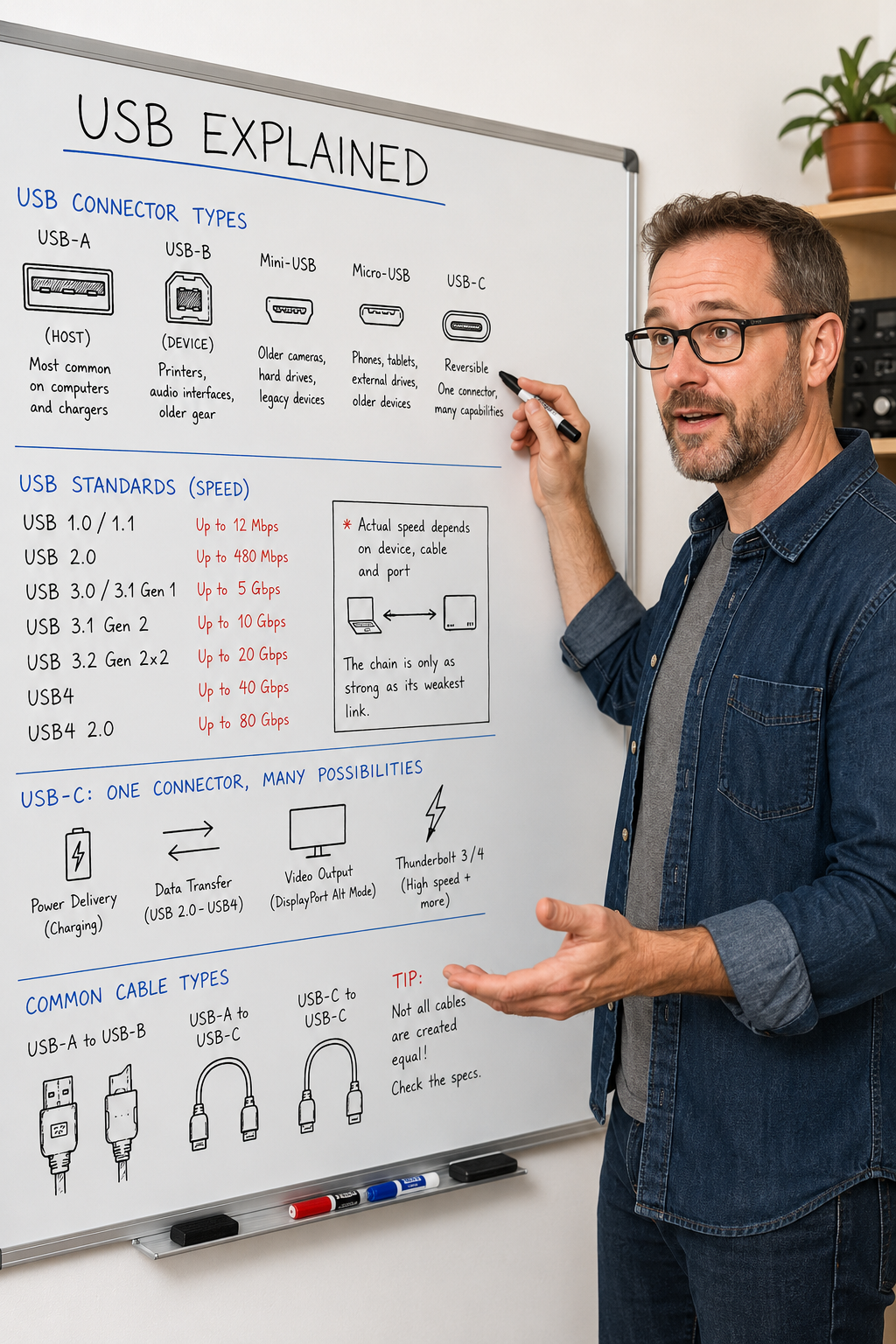
If you have ever looked behind a home studio desk and felt like the cables are quietly forming their own hierarchy, you are not imagining it. USB was designed to simplify everything by replacing a chaotic mix of legacy ports with one universal system. In reality it introduced a new layer of confusion that only becomes obvious when something stops working. For anyone running a home studio, USB is not just technical infrastructure, it is the invisible backbone of recording, playback, and connectivity.
USB began in the late 1990s with USB 1.0, created to solve a very simple problem of too many incompatible ports on personal computers. Before this, users had to deal with serial ports, parallel ports, and manufacturer specific connectors that rarely worked together cleanly. USB 1.0 introduced a universal connector and delivered speeds up to 12 Mbps, which was enough for basic peripherals like keyboards and mice. It was slow by modern standards, but it changed expectations by making plug and play functionality normal rather than rare.
USB 1.1 followed shortly after and focused on improving stability rather than dramatically increasing speed. It refined the early implementation and made devices more reliable in everyday use. The real turning point for creative work came with USB 2.0, which increased speeds up to 480 Mbps. This made external hard drives and early audio interfaces genuinely usable in home studios. Many devices from this era are still in use today because they prioritize stability over raw performance.
USB 3.0 marked a major shift by introducing speeds starting at 5 Gbps, which was a significant leap forward. Over time it evolved into USB 3.1 and USB 3.2, although the naming system became increasingly confusing rather than clearer. Despite the branding chaos, this generation made large file transfers and sample libraries far more practical. However it also introduced a hidden issue where identical looking ports could behave very differently depending on the hardware behind them.
This is where USB confusion really begins for most users working in real environments. A port that looks identical to another may support completely different speeds or features. The physical connector no longer guarantees performance, which breaks the assumption many users naturally make. This mismatch often leads to unnecessary troubleshooting where cables are blamed instead of the actual limitations of the system.
USB-C was introduced as a physical redesign rather than a performance standard. Its biggest visible advantage is that it is reversible, which removes the frustration of incorrect cable orientation. However USB-C does not define speed, power, or capability, it only defines the shape of the connector. Under the same USB-C port you can find anything from slow USB 2.0 performance to high speed USB4 or Thunderbolt functionality.
For home studio users this distinction is critical because not all USB-C ports behave the same way. An audio interface may function perfectly on one port and behave inconsistently on another even within the same computer. This is often influenced by the internal architecture of the machine itself, which is why choosing the right system for creative work matters just as much as choosing the right interface. If you are building or upgrading a setup it is worth understanding broader system decisions as well, which is explored in more detail here. Understanding the computer alongside USB behavior removes a surprising amount of guesswork from studio planning.
Power delivery is another important part of USB that often gets overlooked in studio environments. USB-C can deliver significantly higher wattage than older USB standards, which allows it to charge laptops and power bus powered devices. However the actual power delivery depends on negotiation between the device, cable, and power source. This is why some setups charge quickly and reliably while others struggle to maintain stable power under load.
Cable quality plays a much larger role than most people expect in real world performance. Not all USB-C cables support the same features, and many cheaper cables are limited to charging only. Some cables support data transfer but not at higher speeds, which creates hidden bottlenecks in studio workflows. Inconsistent cable quality often leads to confusing issues that appear to be software related but are actually hardware limitations.
USB4 represents a move toward simplifying this ecosystem while increasing performance capabilities. It is based on Thunderbolt architecture and aims to unify data, video, and power delivery into a more consistent standard. USB4 can reach speeds up to 40 Gbps in earlier versions and even higher in USB4 2.0 implementations depending on configuration. For most home studios this level of performance is more about future proofing than immediate necessity, but it improves long term flexibility.
Thunderbolt is often mentioned alongside USB-C but it is a distinct high performance standard that uses the same physical connector. It guarantees higher bandwidth and more consistent behavior across compatible devices. This makes it particularly useful in demanding workflows involving high track counts, large sessions, or simultaneous audio and video work. However not every USB-C port supports Thunderbolt, which is another common source of confusion.
In real world home studio use, most USB issues are not caused by insufficient speed but by mismatched expectations and hidden limitations. Audio interfaces typically require stable, consistent data flow rather than extreme bandwidth. External drives benefit from faster USB standards, but only when both cable and port fully support those speeds. MIDI controllers are generally low bandwidth but can still suffer from instability when connected through poor quality hubs or cables.
One of the most useful habits in any studio setup is treating USB infrastructure as something that should be understood rather than assumed. Labeling cables and identifying which ports support which standards can significantly reduce troubleshooting time. It also helps to prioritize stability over theoretical performance when recording or monitoring audio. A reliable connection is always more valuable than a fast but unpredictable one in creative work.
Ultimately USB is not a single technology but a layered system of standards that share a common connector shape. This is why two identical looking setups can behave completely differently depending on internal implementation. Once you understand that USB-C is only the connector and not the capability behind it, many common frustrations start to make sense. In a home studio environment that understanding can be the difference between a smooth recording session and a night spent chasing invisible problems.
USB began in the late 1990s with USB 1.0, created to solve a very simple problem of too many incompatible ports on personal computers. Before this, users had to deal with serial ports, parallel ports, and manufacturer specific connectors that rarely worked together cleanly. USB 1.0 introduced a universal connector and delivered speeds up to 12 Mbps, which was enough for basic peripherals like keyboards and mice. It was slow by modern standards, but it changed expectations by making plug and play functionality normal rather than rare.
USB 1.1 followed shortly after and focused on improving stability rather than dramatically increasing speed. It refined the early implementation and made devices more reliable in everyday use. The real turning point for creative work came with USB 2.0, which increased speeds up to 480 Mbps. This made external hard drives and early audio interfaces genuinely usable in home studios. Many devices from this era are still in use today because they prioritize stability over raw performance.
USB 3.0 marked a major shift by introducing speeds starting at 5 Gbps, which was a significant leap forward. Over time it evolved into USB 3.1 and USB 3.2, although the naming system became increasingly confusing rather than clearer. Despite the branding chaos, this generation made large file transfers and sample libraries far more practical. However it also introduced a hidden issue where identical looking ports could behave very differently depending on the hardware behind them.
This is where USB confusion really begins for most users working in real environments. A port that looks identical to another may support completely different speeds or features. The physical connector no longer guarantees performance, which breaks the assumption many users naturally make. This mismatch often leads to unnecessary troubleshooting where cables are blamed instead of the actual limitations of the system.
USB-C was introduced as a physical redesign rather than a performance standard. Its biggest visible advantage is that it is reversible, which removes the frustration of incorrect cable orientation. However USB-C does not define speed, power, or capability, it only defines the shape of the connector. Under the same USB-C port you can find anything from slow USB 2.0 performance to high speed USB4 or Thunderbolt functionality.
For home studio users this distinction is critical because not all USB-C ports behave the same way. An audio interface may function perfectly on one port and behave inconsistently on another even within the same computer. This is often influenced by the internal architecture of the machine itself, which is why choosing the right system for creative work matters just as much as choosing the right interface. If you are building or upgrading a setup it is worth understanding broader system decisions as well, which is explored in more detail here. Understanding the computer alongside USB behavior removes a surprising amount of guesswork from studio planning.
Power delivery is another important part of USB that often gets overlooked in studio environments. USB-C can deliver significantly higher wattage than older USB standards, which allows it to charge laptops and power bus powered devices. However the actual power delivery depends on negotiation between the device, cable, and power source. This is why some setups charge quickly and reliably while others struggle to maintain stable power under load.
Cable quality plays a much larger role than most people expect in real world performance. Not all USB-C cables support the same features, and many cheaper cables are limited to charging only. Some cables support data transfer but not at higher speeds, which creates hidden bottlenecks in studio workflows. Inconsistent cable quality often leads to confusing issues that appear to be software related but are actually hardware limitations.
USB4 represents a move toward simplifying this ecosystem while increasing performance capabilities. It is based on Thunderbolt architecture and aims to unify data, video, and power delivery into a more consistent standard. USB4 can reach speeds up to 40 Gbps in earlier versions and even higher in USB4 2.0 implementations depending on configuration. For most home studios this level of performance is more about future proofing than immediate necessity, but it improves long term flexibility.
Thunderbolt is often mentioned alongside USB-C but it is a distinct high performance standard that uses the same physical connector. It guarantees higher bandwidth and more consistent behavior across compatible devices. This makes it particularly useful in demanding workflows involving high track counts, large sessions, or simultaneous audio and video work. However not every USB-C port supports Thunderbolt, which is another common source of confusion.
In real world home studio use, most USB issues are not caused by insufficient speed but by mismatched expectations and hidden limitations. Audio interfaces typically require stable, consistent data flow rather than extreme bandwidth. External drives benefit from faster USB standards, but only when both cable and port fully support those speeds. MIDI controllers are generally low bandwidth but can still suffer from instability when connected through poor quality hubs or cables.
One of the most useful habits in any studio setup is treating USB infrastructure as something that should be understood rather than assumed. Labeling cables and identifying which ports support which standards can significantly reduce troubleshooting time. It also helps to prioritize stability over theoretical performance when recording or monitoring audio. A reliable connection is always more valuable than a fast but unpredictable one in creative work.
Ultimately USB is not a single technology but a layered system of standards that share a common connector shape. This is why two identical looking setups can behave completely differently depending on internal implementation. Once you understand that USB-C is only the connector and not the capability behind it, many common frustrations start to make sense. In a home studio environment that understanding can be the difference between a smooth recording session and a night spent chasing invisible problems.
You may purchase items mentioned in this article here. Affiliate links earn me a commission at no extra cost to you. Thanks for supporting IanGardner.com